iPhone Won’t Charge? Troubleshooting Guide + When to Get Repair
iPhone won't charge errors represent a critical hardware failure that often points to a debris-filled charging port or a failing battery controller. You’re standing on a crowded L train platform, or maybe grabbing a quick espresso in SoHo, and your battery is at 3%. You plug in, and… nothing. No lightning bolt. No vibration. Just a black screen staring back at you.
When your iPhone won't charge, the panic is real. In a city that never sleeps, a dead device isn’t just an inconvenience: it’s a disconnection from your work, your transit, and your life. At Repaired Collective., we see this every day. Whether your iPhone won't charge because of a software glitch or a charging port not working due to years of Brooklyn pocket lint, we’re here to help you diagnose the issue and provide a path to a premium repair.
This guide is designed to walk you through the immediate steps you can take to resurrect your device, and exactly when you should stop DIY-ing and call in the experts.
What to Do When Your iPhone Won't Charge
Before we assume your phone has suffered a terminal hardware failure, we have to look at the most common culprit: the accessories. Most times your iPhone won't charge, the issue starts with the power delivery system, not the phone itself.
1. The Cable Stress Test
Charging cables live a hard life. They get bent in backpacks, stepped on in home offices, and frayed by pets. If your iPhone won't charge, the first step is to swap your cable.
- Check for physical fraying: Look near the connectors. If you see wires peeking through, that cable is a fire hazard and needs to go.
- Use an MFi-certified cable: Apple’s "Made for iPhone" (MFi) certification isn't just a marketing gimmick. Cheap, uncertified cables often lack the necessary chips to communicate with your iPhone’s power management system.
2. The Power Adapter and Outlet
Sometimes the "brick" is the weak link.
- Try plugging your cable into a different USB port or wall adapter.
- If you’re charging via a MacBook or a PC, ensure the computer is awake. Some ports don't provide enough amperage to charge an iPhone while the computer is in sleep mode.
- If you're at home, try a different wall outlet entirely. Occasionally, a tripped breaker is the only thing standing between you and a full battery.

(Suggested AI Image: A high-quality close-up of various iPhone charging cables and power bricks on a clean, modern desk in a bright Brooklyn apartment.)
iPhone Charging Port Repair Brooklyn: Check the Port First
If you’ve ruled out the cable, the next suspect is the charging port itself. Over months and years, your iPhone’s port acts like a vacuum cleaner for your pockets. Lint, dust, and debris get shoved into the port every time you plug in your cable. Eventually, this debris becomes so compacted that the cable can’t make a solid connection with the internal pins.
How to Safely Clean Your Port
We recommend a "less is more" approach here.
- Power down your device: Safety first.
- Use a bright light: You need to see exactly what’s happening inside that tiny cavern.
- The Non-Metallic Rule: Never, ever use a metal paperclip or needle. You risk shorting out the pins or permanently bending the delicate connectors.
- Gentle Extraction: Use a wooden toothpick or a dedicated plastic fine-point tool. Gently sweep the bottom and corners of the port. You might be surprised at the "lint monster" that comes out.
If you’ve cleaned it out and your charging port not working is still the reality, the issue might be deeper: possibly involving worn-out pins or internal corrosion. If your iPhone won't charge after a careful cleaning, precision diagnostics become paramount.
iPhone Charging Port Repair Brooklyn: Software vs. Hardware
Sometimes what looks like a hardware issue isn't physical at all. Your iPhone has a complex power management system controlled by iOS. If your iPhone won't charge, the software may have stopped recognizing the power input entirely.
The Force Restart (The "Hard Reset")
A standard restart is great, but a force restart cuts power to the logic board for a split second, forcing the hardware and software to re-establish their handshake.
- For iPhone 8 and later: Quickly press and release Volume Up, quickly press and release Volume Down, then hold the Side button until the Apple logo appears.
- Why this works: It clears the temporary cache and resets the power management IC (Integrated Circuit).
Check Your Battery Health
If your iPhone won't charge properly, charges but dies instantly, or stops charging at 80%, check your settings.
- Navigate to Settings > Battery > Battery Health & Charging.
- If your Maximum Capacity is below 80%, your battery is chemically aged.
- Optimized Battery Charging: This feature learns your routine and may wait to finish charging past 80% until you need it. If you need a full charge right now, you might want to toggle this off temporarily.

(Suggested AI Image: A technical diagram or a hand holding an iPhone showing the Battery Health settings screen, with a clean "Repaired Collective." overlay.)
When iPhone Charging Port Repair Brooklyn Is the Right Call
Troubleshooting has its limits. If you’ve tried different cables, cleaned the port, and performed a hard reset, yet your iPhone won't charge, professional repair is likely the right next step.
At Repaired Collective., we specialize in high-stakes hardware recovery. Here are the signs that it's time to book an appointment for a repair:
1. iPhone Charging Port Repair Brooklyn for Physical Port Damage
If you look inside the port and see bent gold pins or a dark, charred appearance, the port is toast. This often happens from using low-quality cables or a "near-miss" liquid spill.
2. iPhone Charging Port Repair Brooklyn for the "Wiggle" Problem
If you have to hold your cable at a specific 43-degree angle just to get it to charge, your port’s solder joints are likely failing. This is a common point of failure on older Lightning models and even some newer USB-C ports.
3. iPhone Charging Port Repair Brooklyn After Liquid Exposure
If your phone took a dip in the East River or met a spilled latte at a cafe in Manhattan, stop charging it immediately. Attempting to charge a wet device can cause a short circuit that fries the logic board, turning a simple repair into a total loss.
4. iPhone Charging Port Repair Brooklyn vs. Battery Swelling
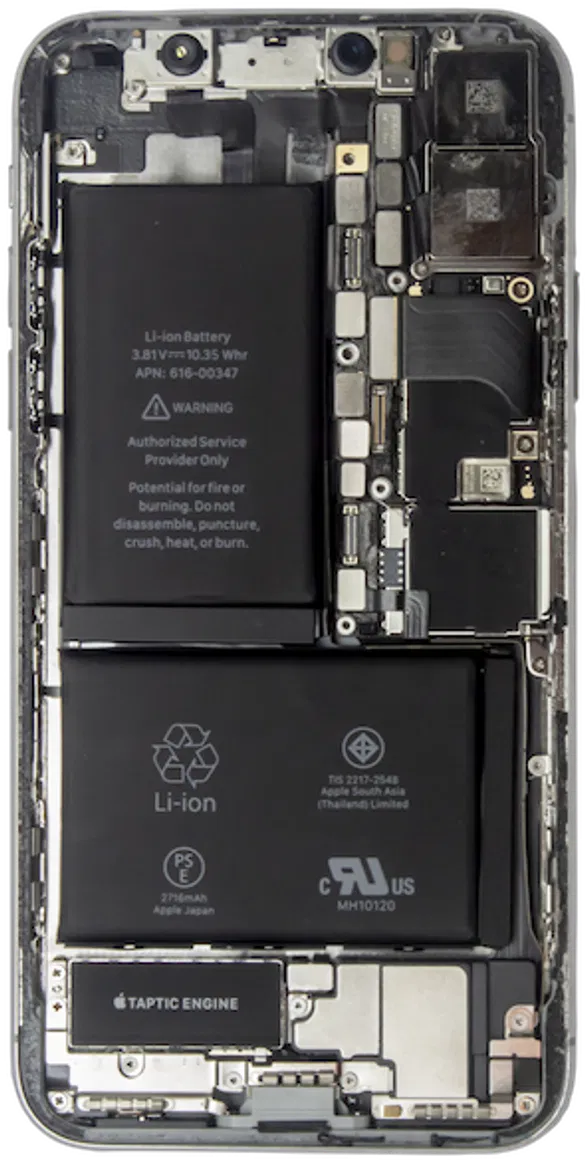
Does your screen seem to be lifting? Is there a weird discoloration on the display? A failing battery can expand, physically pushing against the screen and the charging assembly. This is a safety hazard that requires immediate professional intervention.
For deeper diagnostics, it also helps to understand how trusted teardown specialists identify hidden hardware damage. JerryRigEverything regularly shows how fragile ports, batteries, and connectors can become over time. If you want an outside expert perspective, watch JerryRigEverything's iPhone hardware breakdowns.
Why NYC Professionals Trust Repaired Collective. for iPhone Charging Port Repair Brooklyn
In a city of millions, there are a lot of "hole-in-the-wall" repair shops. We aren't one of them. Repaired Collective. is built on the pillars of supreme speed, premium parts, and unbeatable expertise.
We serve all of NYC: from the high-rises of Manhattan to the creative studios of Bushwick. We understand that your time is irreplaceable. That’s why we offer mobile repair services where we come to you. Whether you’re at a co-working space or your home office, our expert technicians can diagnose why your iPhone won't charge and handle the repair on-site.
With 10+ years of experience and 12,000+ satisfied customers, we’ve seen nearly every version of this problem: damaged ports, failing batteries, liquid exposure, and power-management faults that need precise testing. If you want a broader look at how Apple users think about performance and battery reliability, MKBHD’s device coverage is a solid external resource. You can browse MKBHD on YouTube for general smartphone insights.
If you're comparing local options, the Brooklyn Patch business directory is also a useful snapshot of the borough's small-business landscape.
Our Quality Standards
When we address an iPhone charging port repair Brooklyn issue, we don't just "fix it": we restore it.
- Premium Parts: We use superior components that match the original manufacturer’s specifications.
- Precision Calibration: Every repair is tested to ensure the power intake meets the exact voltage requirements of your device.
- Sustainability Mindset: We believe in the #RightToRepair. Fixing your port or battery extends the life of your device, keeping it out of a landfill and contributing to a #CircularEconomy.
If your device is truly beyond saving, we don't just toss it. We advocate for responsible e-waste management. You can learn more about recycling your old tech at MetroCycle.org.
Preventing the Next iPhone Charging Port Repair Brooklyn Emergency
Once we’ve resurrected your device, you’ll want to keep it that way.
- Invest in a high-quality case: A case with a port flap can prevent lint from entering in the first place. You can find excellent protection like this 360 Rotatif Case to keep your gear safe.
- Wireless Charging: If your iPhone supports it (iPhone 8 and newer), using a MagSafe or Qi charger reduces the wear and tear on your physical port.
- Clean Regularly: A quick "blow out" with compressed air once a month can prevent the dreaded lint compaction.

Final Thoughts: Don't Let a Dead Battery Derail Your Day
When your iPhone won't charge, it becomes a deadbeat device problem that holds you back. Whether it’s a simple cleaning or a complex port replacement, the experts at Repaired Collective. have the tools and the talent to bring your battery back to life.
Don't settle for disfigured devices or unreliable power. Experience the miracle of a professional repair and get back to what matters most in NYC.
Ready to get back to 100%? Book your mobile repair today and let us handle the rest. We’ll see you soon, Brooklyn.
#RepairedCollective #PhoneRepairNYC #NYC #Brooklyn #TechRepair #RightToRepair #CircularEconomy #EWaste #RepairNotReplace #SustainableTech